Login

What is Avalanche Outage Reporter?

Avalanche Outage Reporter is a SaaS product that enables utilities (Power, Water, Gas), to provide a mobile solution to customers so they can report and review outage status.
  • Easy Set Up

    30 minute setup. Highly intuitive for dispatchers, and customers open a PWA on their phone from a link on your website, emails or TXT. Customers can save the app on their phone or desktop.

  • Immediate Outage Reports

    Customers report outages for single or multiple locations directly from their phones. The Control Room see the Reports as markers on a map, data in a grid, and various notification options.

  • Integration Friendly

    Utilities can simply integrate to Avalanche OCP or an OMS to provide real-time outage information about saved locations.


Less calls, more information

Avalanche Outage Reporter reflects our many years of expertise in dealing with outage call management. It provides real benefits to utilities including:
  • Reduced communication costs

    Most call centers cost about $6/call to process a fault call. An outage report via Avalanche Outage Reporter is instant and no cost!
  • Faster identification of issues

    Lower SAIDI/CAIDI costs. More information allows you to identify and resolve faults faster.

Any utility can use it

Avalanche Outage Reporter will operate anywhere in the world. It is smart enough to work out which utility to notify based on the user's location.
  • Integrate into your OMS

    Outage Reporter has a modern webhook API allowing you to collect notifications and update your OMS in real-time.
  • No setup costs

    It's simple for customers to access from a URL link on their smart phone, with no app to install. The Control Room interface is designed for fast identification and response.

Simple, Multi-Network

Outage Reporter supports all your networks in one place; Power, Water and Gas; with configurable causes and information for each network in a simple user interface.
  • Designed for the Control Room

    Outage Reports appear instantly as icons on a map or in a grid with address and cause details and a call back number.
  • Configurable Notifications

    You can configure alerts via TXT or email so you get notified that there is an event, even if the control room doesn’t have AOR open.

Setup in less than 30 minutes

Setup Avalanche Outage Reporter for FREE in less than 30 minutes. Register your utility now and try it for yourself!

Setup Your Utility
  • Use your own branding

    Upload your own logo to brand it as your own web app.
  • Easy definition of your network coverage

    Define your network territory by simply creating a KML file in Google Earth for your utility, or exporting one from your GIS.
  • Immediate customer updates

    No calls, no hassle, customers get updates on all their saved locations through Avalanche OCP integration.
  • Up and working in under 30 minutes..

    Customers deserve to be able to have a fast way to submit this valuable information about outage location and cause.

Have some more questions?

Avalanche Outage Reporter has been designed to be simple! So, here’s some FAQ’s which should answer any questions and help you get up and running.
We like Simple. AOR has been designed to be simple to setup. SImple to use. Simple to get benefits from hour one. It will take roughly 30 minutes. You can do it following the steps below, or just give us a call and we can walk you through the setup, or as part of a demo. It really is that simple.
    1. Click the "Register” button above and just fill out some basic information about your Utility (1 minute).
    2. Verify your email. (1 minute).
    3. Login. Update your logo, notification preferences, review the prefilled Causes and adjust those as required. (5 minutes).
    4. Check out the mobile app and submit your outage report and see how it displays on the map, grid, and when notifications start showing up. (10 minutes)
    5. Build and upload the KML file to define your network supply area (10 minutes), or ask GIS team to provide you with one (1 minute :) )!
    6. Email the link to the Reporter app to your team. (1 minute)
    7. Show your Co-Workers and the management team how clever and productive you have been (Rest of the day).
So about 30 minutes from start, to Hero!

Absolutely! When you set up your organisation in the maintenance area just add a logo, and as if by magic it will appear on the AOR mobile application.

Yes. AOR has a modern real-time webhook API to allow you to push the outage reports straight into your OMS. Details are available at the bottom of the Network Settings page once you have enabled this feature.
  • It's fast, simple to use, and they don't have to install yet another app.
  • The same app works across desktop and mobile.
  • AOR is a simpler way for your customers to report outages and avoid the frustration of long phone queues to report and receive basic information.
  • AOR demonstrates to customers that you care about how they want to get and submit information.
  • Customers can save multiple locations, so if they want to save their house, office, warehouse, holiday home, they can set these up in advance. If the utility is also using Avalanche, then the status of power supply will automatically be shown against that saved location!
Dispatchers can view outage reports on a map, or in a grid. There are various ways to filter the outage reports, by type (eg transformer fire, lines down, or just "no power". All reports are geo-referenced and dispatchers can easily click to call if they want more detail from the reporter. You can also setup alerts on screen or via email, SMS/TXT and MSTeams notifications when there have been more than "x" reports in an area within a time window, to help identify outage hotspots faster than takign inbound calls, or checking social media complaints..
Yes. We understand the seperation of Network Ownership and Management and multi-network single branding. AOR fully supports a single brand across non-contiguous geographic areas and will still show your customers a single brand. We can quickly show you how this works.
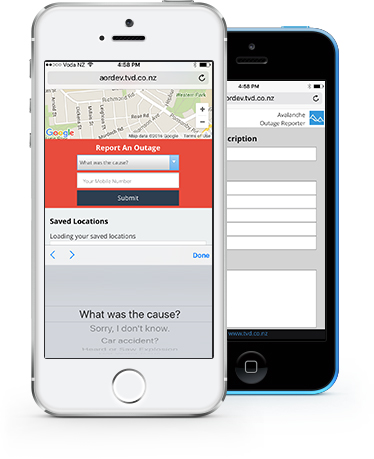
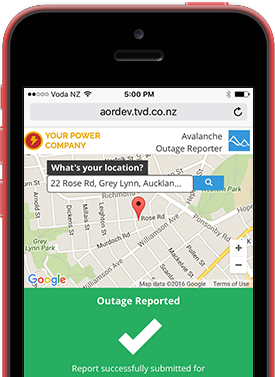
Yes! This is a mobile web application. Your customers don't have to install anything or configure it with meter numbers or anything else. We know customers have little patience when their power/water/gas is out so it is designed to be simple! Customers just click a link on your website, scan a barcode on a bill, click a link in an SMS, or any other way you want to have them open the app. Just try doing it yourself here; m.outagereporter.net and the Outage Reporter application displays just as shown above, but with your logo/branding! It's your app! Outage Reporter will automatically work out where the customer is located and they can then submit outage reports along with a Cause if known, and a contact phone number so you can call them back for more details. Customers can even add an app button to their phone home screen so it even looks like an app.
Yes, if you are an Avalanche OCP customer we will automatically connect up AOR so when your customer save a location they are interested in eg their home address, Holiday house, Factory, Parents house they can see the real-time status of planned and unplanned outages.

Absolutely!, Avalanche Outage Reporter is a standalone application designed to run independently from Avalanche OCP.

Dispatchers login using OAuth2/SSO or standard username/password and have a real-time browser interface to view outage reports on maps and grids, and you can setup desktop and external alerts (eg Email, SMS, and MSTeams channel notifications, based on the number of reports in an area within a time window.
Of Course! we would love to talk with you about how quick this is to setup and start streamlining inbound information to help get the power back on faster. Just let us know a convenient time and we can run through a 30 minute demo. If you like we can also show you how fast it is to setup so you can show others after the demo.
No. We had this feature but found that certain people in the community took pleasure in attaching undesirable images. So based on user feedback we disabled that function.
Yes. AOR allows you to upload overlapping networks and customers can select which network they wish to report an outage or issue for. Networks can have different levels of alerting, and/or where the alerts are sent to eg Water reports and alerts go to the Water team, and Electricity reports go to the Electricity team.